Introduction & basics
The Mover API is organized around REST. Our API uses POST or GET methods. The API validates and accepts request models and is often processed asynchronous to ensure scalability and fast responses. All requests and responses are in JSON format. The API uses standard HTTP response codes.
Table of contents
Authentication
A subscription key is provided in the header to identify you:
Ocp-Apim-Subscription-Key
The keys can be set and reset in the developer portal. The keys are different for each environment.
Environments
You have two environments available: A test environment and a production environment. The test environment allows you to test functionalities, operational flows or explore ideas without jeopardizing your production.
Access the LMS here:
Production: https://tms.movertransport.com
Test: https://www.mover.dev
The API base domains for integration are as follows:
Production: https://prod-api.mover.dk
Test: https://test-api.mover.dk
API versions
You must specify the version of the HTTP operation in the header of the request with the header:
Api-Version
It will show in each operation of which API version you should use.
Idempotency key
The API supports idempotency for safely retrying requests without accidentally performing the same operation twice. This is useful when an API call is disrupted in transit, and you do not receive a response. For example, if a request to create an order does not respond due to a network connection error, you can retry the request with the same idempotency key to guarantee that the message is only processed once.
Subsequent requests with the same key will return the same success message and do not process if the content is different from the initial message. An idempotency key is a unique value generated by the client and used by the server to recognize retries of the same request. How you create unique keys is up to you, but we suggest using V4 UUIDs or another random string with enough entropy to avoid collisions.
The idempotency key is sent in the header:
Idempotency-Key
Errors
Mover uses conventional HTTP response codes to indicate the success or failure of an API request. In general: Codes in the 2xx range indicate success. Codes in the 4xx range indicate an error that failed given the information provided. Codes in the 5xx range indicate an error with Mover’s servers.
Retries
All applications that communicate with remote services and resources must be sensitive to transient faults. This is especially important for applications that run in the cloud where the nature of the environment and connectivity over the Internet means these types of faults are likely to be encountered more frequently. Transient faults include the momentary loss of network connectivity to components and services, the temporary unavailability of a service, or timeouts occurring when a service is busy. These faults are often self-correcting and will likely succeed if the action is repeated after a suitable delay.
Status codes
200
Success with a response body.
202
Message accepted and will be processed asynchronous.
204
Success and processed – but no response object.
401
Unauthorized. No valid API key provided.
Retry policy: Do not retry
402
Failed. The parameters were valid, but the request failed.
Retry policy: Retry
403
Forbidden. The API key does not have permissions to perform the request.
Retry policy: Do not retry
404
Not Found. The requested URL does not exist. Please check if correct API version is provided in header.
Retry policy: Do not retry
422
Indicates that provided request model have invalid or missing properties. The response object will contain information of what information is missing or invalid.
Retry policy: Do not retry
429
Too many requests hit the API too quickly.
Retry policy: Retry with exponential backoff of your requests.
5xx
Internal server error. This is if Mover has an error.
Retry policy: Retry
Good to know
Order IDs are unique.
Minimum 1 collo per order is required to be added before planning. A collo is a package/bag/pallet or other shipment unit. There are two types of colli: “Estimated” or “Actual”. “Estimated” should be added to the order if you route optimize before you know the exact amount of colli. When the exact number is known, you should add “Actual”.
Units are in SI-format. Please see article: International System of Units.
Idempotency-key should be provided.
Categorizing orders
At Mover, we use tags to create and identify different order categories. This is beneficial in multiple scenarios, including:
Planning
If you have multiple operational flows, you need to mark whether the order should go to flow A or B.
Example: Courier and Distribution
A typical scenario could be if you have both a courier and distribution flow. If your own business logic has categorized an order as courier or distribution, you would tag the order in the creation process with e.g., 'courier' or 'distribution'.
Example: Multiple Distribution Flows
Another typical scenario could be if you have multiple distribution flows. If your own business logic has categorized an order to be in Flow A or Flow B, then you would tag the order in the creation process with e.g., FlowA or FlowB to plan it separately.
Route optimization
If some orders need special handling by specific vehicles or have special handling time, you will tag the order to make it easy for the route planner to identify it.
Communication
You can differentiate your communications content and flows by defining multiple types of categories.
Identification
By adding a specific tag for orders with deviating characteristics, you make it easier for your customer support to find them.
Flows
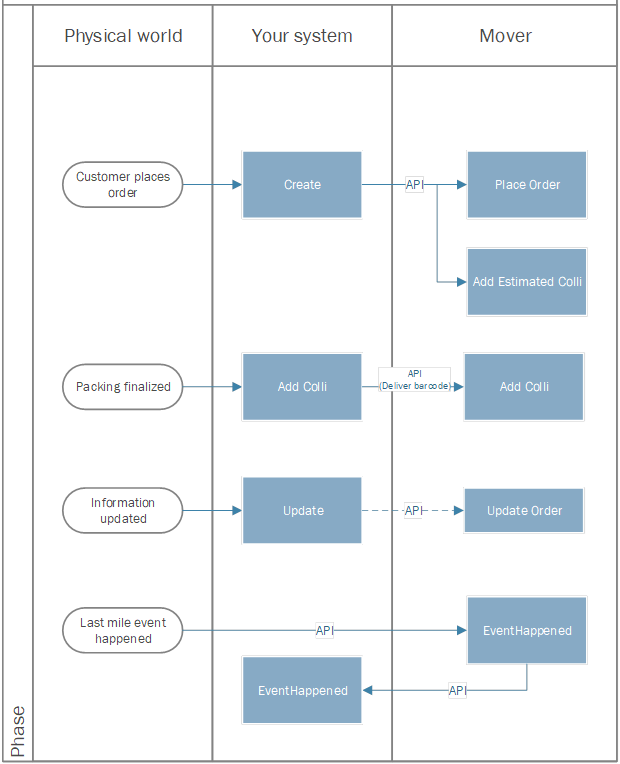
Many operational flows are unique, but a common flow could be described as illustrated below: